
RecoverEQ gives every case manager a real-time coach on every call.
It prompts best-practice responses in the moment, writes up the call afterwards and keeps the worker's story intact from one case manager to the next.
Behind every case number is a person retelling their story again.
Every handover asks an injured worker to retell their story to a stranger, reliving it instead of recovering from it. Every unprepared conversation risks the wrong response at the wrong moment, and every stalled relationship between insurer, treating practitioner and employer slows the one thing that gets people back to work: momentum.
92% of Australian insurers report a talent deficit deep enough to affect claims efficiency (Source: Gallagher Bassett, The Carrier Perspective: Claims insights, 2025.) SIRA's 2025 review links claims manager capability directly to worker outcomes, and calls for clearer communication and stronger handover protocols.
Support before the call, during and after every conversation, and when the worker is ready to return to work.
Reports become one bio-psycho-social profile that updates as recovery progresses.
Live prompts grounded in motivational interviewing, then notes and next steps written for you.
When the worker is ready, hazards flow straight into a plan the practitioner can sign off.
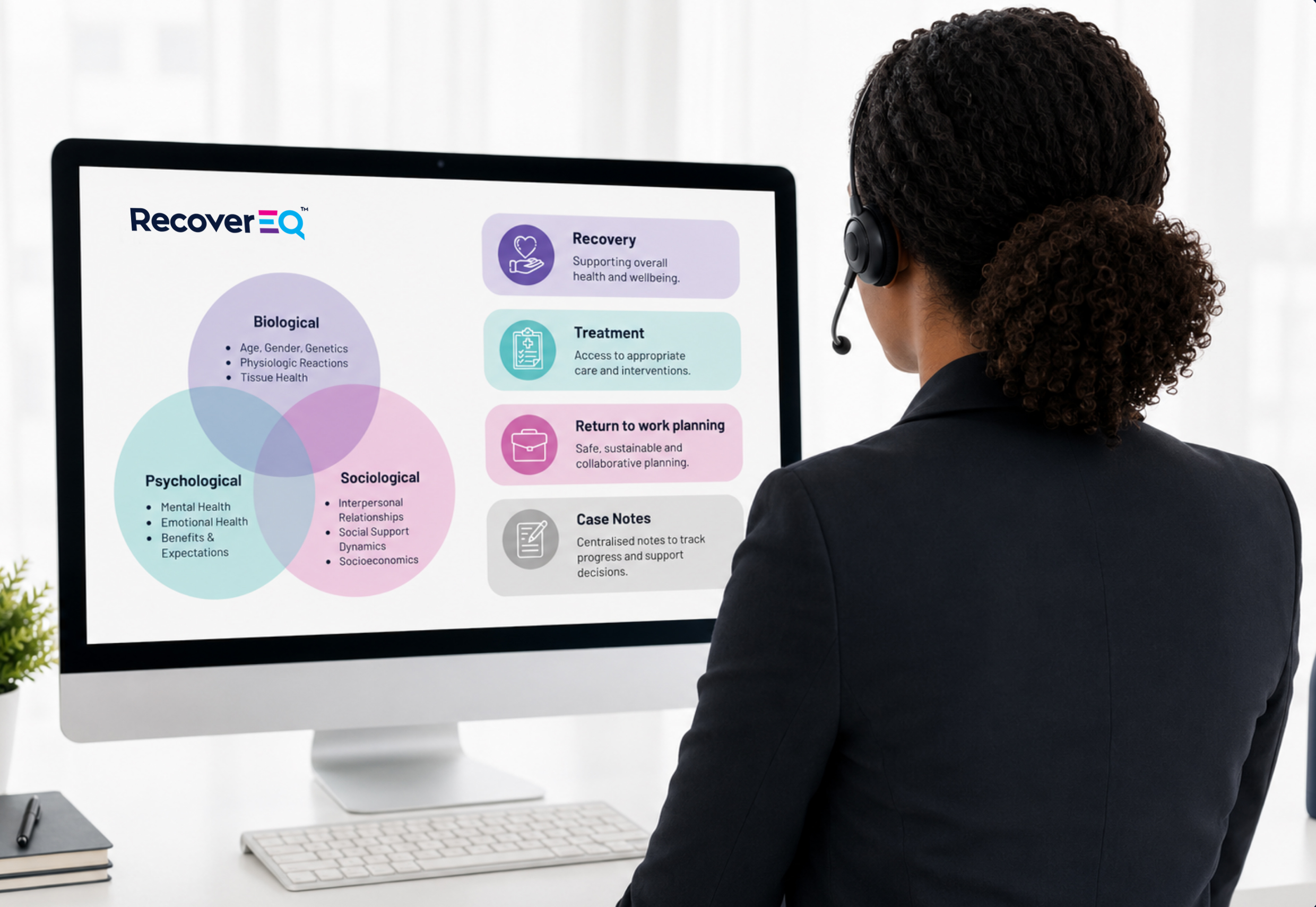
RecoverEQ reads the file so your case manager doesn't start from zero. Independent medical reviews, psychologist reports, GP notes and progress updates become one clear bio-psycho-social profile, showing barriers, treatment opportunities, engagement considerations and support needs at a glance.
The profile keeps evolving as recovery progresses, so whoever picks up the file sees an accurate, current picture of the person behind the claim.
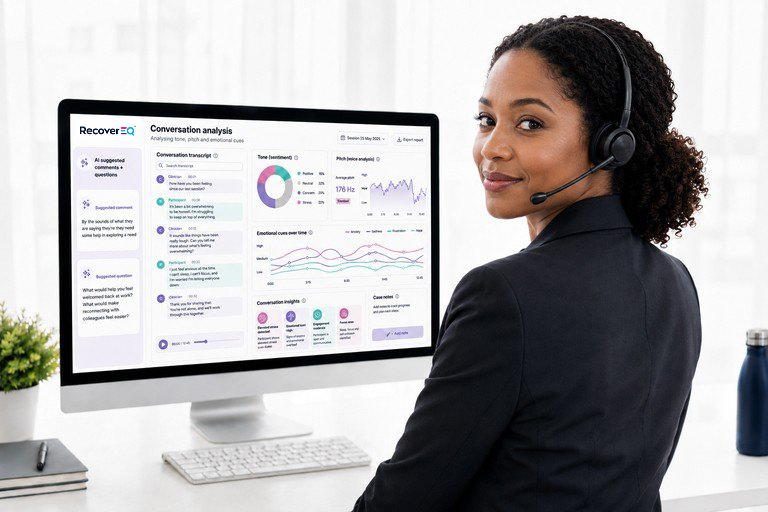
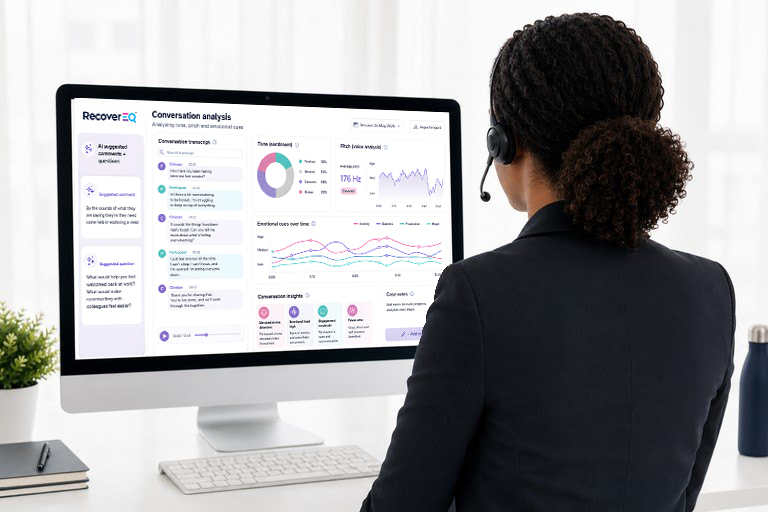
RecoverEQ identifies key words and speech patterns and delivers a tailored coaching prompt drawn from a proven library of therapeutic modalities. When the moment calls for it, a prompt appears with what to say next, grounded in motivational interviewing and person-centred practice.
When the call ends, it summarises the key points, saves them to the worker's record and recommends tailored next steps.
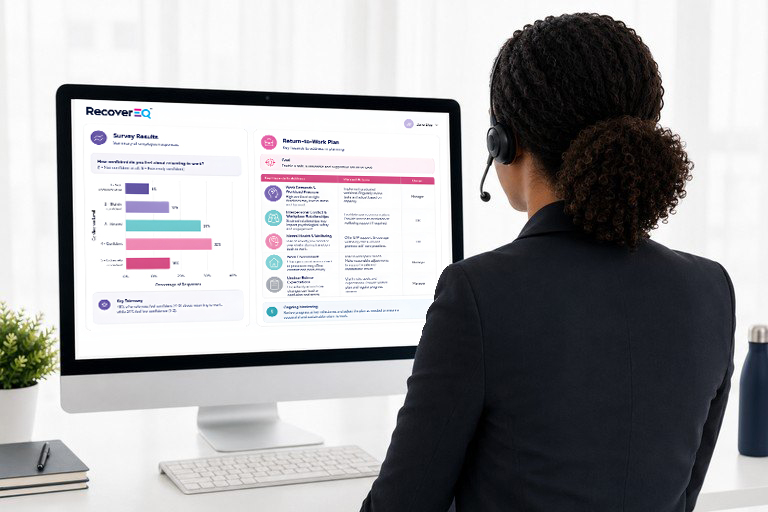
When the worker is open to talking about a return to work, RecoverEQ guides the case manager through a validated psychosocial risk assessment and feeds the results straight into a pre-populated return-to-work plan.
The hardest moments in a claim happen live, on the phone, with no time to look anything up.
Why it works: The case manager reflects what the worker values and invites them to describe it, which is where motivation to recover begins.
Why it works: Reflecting the feeling before problem-solving shows the worker they've been heard, so the conversation can move forward.
Illustrative examples. Clinical wording to be approved before launch.
Every prompt comes from a proprietary therapeutic library built on validated, evidence-based recovery and return-to-work methodology, held in a private, isolated environment and never exposed to public AI models.
RecoverEQ closes the capability gap in real time, so every case manager, junior or senior, can deliver the empathetic, continuous support that gets people back to work sooner and more safely.
Our working prototype is ready to present from October 2026. We're selecting a small group of partner organisations for the next phase of development.
Walk through a live demonstration and explore how RecoverEQ would fit your claims operation, your team and your systems.
Get early access, embed RecoverEQ into your KPIs and leadership practices, and help shape the final solution before wider release.
It listens as the manager and worker talk, works out what is going on for the worker, and suggests the next line for the manager to say. Suggestions are built on RecoverEQ's clinical line library. In Settings, managers choose how far the AI goes, from "Framework only" (the library's lines, word for word) to "AI leads", within a limit set for your organisation. The default, "AI writes", has the AI write lines for the moment in the library's style. With a pre-call briefing, the call follows the goals and barriers the briefing finds in the worker's documents, and any setting above "Framework only" lets the AI write lines for the barrier in play. After the call, RecoverEQ drafts case notes for the manager to check.
Yes, in Chrome or Edge, today:
Anyone else on the Teams call is heard as the worker too. Zoom in the browser works the same way. The Teams desktop app isn't supported: hearing it directly needs a compliance-recording integration, which is not built yet. It can be scoped as part of a pilot.
Not yet. RecoverEQ can already work from a separate audio stream for each person, and Genesys Cloud, Amazon Connect, NICE CXone and phone systems that support SIPREC can each send call audio that way. Connecting a specific platform is integration work that is not built yet and would be scoped in your pilot.
No. The manager always decides. RecoverEQ suggests a line, and the manager chooses whether and how to use it. With a briefing, suggestions are for the barrier in play; in "Framework only" mode they come straight from the library. The AI's suggestions read how the worker sounds and help steady push-back. They never suggest wrapping up the call, arguing with the worker or defending the process. Closing questions appear only when the manager chooses to close out the call.
Every line the AI writes is checked on RecoverEQ's server before the manager sees it. A line for the card is refused if it:
If a line fails, or isn't ready within 1.5 seconds of the worker's words being transcribed, the manager sees a library line instead, or keeps the question already on screen. After the call, the Performance page lists every line the AI wrote or changed, with the worker's words before it, how the worker sounded, whether the manager used it, and the library line it came from where there is one, so a clinician can review it.
Everything said is checked for risk language first, on the manager's computer, using fixed rules with no AI: the clinical team's risk phrases and RecoverEQ's wider patterns around them. RecoverEQ's server runs the same check, and the AI's reading of the call can raise risk too, but nothing can lower it. A "Risk may exist" banner then tells the manager to proceed with caution and follow your organisation's risk policy and procedure. It opens a safety card with approved wording to say aloud, your policy, a button to record that the manager followed it, the words that raised the alert, and Australian crisis services from the clinical team's list. The approved wording and policy line can be your own. For the rest of the call, the AI writes no lines for the card: suggestions come from the library, or from the questions prepared in the briefing. The disclosure goes into the draft case notes as a factual entry, even if the AI write-up is unavailable. RecoverEQ points to your existing process; it does not assess risk.
RecoverEQ's clinical framework comes from the clinical team's spreadsheets: the line library (version 2.3.1, with 1,243 lines across 17 states and 186 barriers), 32 risk phrases and 48 gentle encouragers. It loads directly from those spreadsheets, so no line is retyped by hand.
No. It is a web app that runs in Chrome or Edge, on a computer with a microphone.
No audio is kept. Speech is transcribed in real time by Azure AI Speech in Australia, which stores nothing for live transcription (Microsoft), and RecoverEQ discards the audio. The transcript stays in the manager's browser for that call. It is cleared on Reset, New call or closing the tab, and RecoverEQ's servers do not save it. While the call runs, its text goes to the AI to suggest lines and draft the notes (see "Where is our data processed?"). In production, transcripts would be stored with the claim, in Australia.
Yes. We recommend telling the worker at the start of every call, using wording your legal team approves.
No. PDFs are read in the browser; the file itself is never uploaded. Their text goes to the AI to write the briefing, and to answer the manager's questions in the briefing's Ask tab. RecoverEQ's servers keep none of it, and the briefing clears on Reset, New call or closing the tab. The AI provider deletes what it is sent within 30 days by default, and zero data retention is available by agreement (Anthropic). [Confirm which applies to RecoverEQ's account before quoting it.]
| Part | Where it runs today | Planned for production |
|---|---|---|
| Service, database and speech relay | Azure Australia East | Azure Australia East |
| Speech to text (Azure AI Speech) | Azure Australia East | Azure Australia East |
| Logs and monitoring | Azure Australia East | Azure Australia East |
| The live call's AI: reading the call, suggested lines, the closing read-back, Ask (Claude Haiku 4.5) | Anthropic API, United States | Amazon Bedrock, Sydney and Melbourne |
| Briefing and case notes (Claude Opus 5) | Anthropic API, United States | [To confirm] |
| Web page (holds no data) | Azure Static Web Apps, served from Microsoft's global network | [To confirm] |
Amazon Bedrock offers Claude Haiku 4.5 with processing kept within Sydney and Melbourne (AWS). RecoverEQ does not connect to Bedrock yet.
Yes. RecoverEQ can run on your own Anthropic key and your own Azure AI Speech resource, so the usage, bills and data agreements are yours. Keys are held on the server in Azure Key Vault and never reach the browser.
RecoverEQ is at pilot stage. The service, its database and speech to text run in Australia; the AI runs in the United States today (see above). Keys are held in Azure Key Vault and never reach the browser. For pilot organisations, they will be set up with their own secure digital sign in. sign-in. Today each call's record (every line shown, whose words each was, and why) is on the Performance page until Reset. Most of the infrastructure is defined in code (Bicep), so environments are repeatable and reviewable.
No. RecoverEQ does not train models on your data. Anthropic says data from its API is never used for model training without your express permission (Anthropic), and Azure AI Speech keeps no live speech at all. [Confirm against the agreement for your account before quoting.]